Deduplication: Related tickets merge automatically.
Bot ↔ Human: Context is transferred seamlessly.
Consistent SLA: Same control across channels.
Example scenario
A customer starts on live chat and then switches to phone. The agent sees the chat history, customer profile and actions taken.
The conversation continues where it left off; the “repeat yourself” loop disappears.
Design workflows, SLAs, escalations, checklists and forms for each category. Manage tickets end-to-end.
SLA and Delay Management
Time limits, alerts and automatic escalation keep every step under control
SLA & Delays
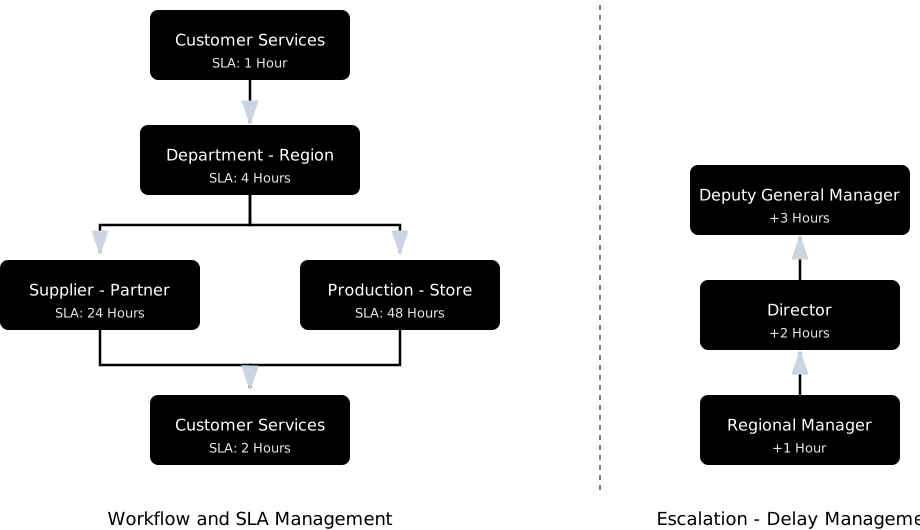
Per-step time limits: Deadlines and alerts defined for every step.
Automatic action on breach: Escalation, reassignment, notification.
End-to-end tracking: SLAs monitored per step and overall.
Conditional routing: Fast lane for VIPs, extra approval for high amounts.
Manager visibility: Where every case stands and what is delayed, at a glance.
Example Scenario
A store confirmation runs late; the system warns before the deadline and escalates the case to the team lead with full context.
A remedy is suggested based on customer tier; the process closes within SLA limits.
AI Agents and Bots
AI-based agents and bots help manage customer requests coming from communication channels with AI, reducing your costs.
How It Works
Resolve customer requests 24/7 with a hybrid (Guided + LLM) bot. When needed, hand off to an agent in the same thread — full history and context included.
Resolve customer requests 24/7 with a hybrid (Guided + LLM) bot. When needed, hand off to an agent in the same thread — full history and context included.
Monitors email, social media, reviews, marketplaces; classifies tickets, responds. Completes when possible — otherwise starts the relevant workflow.
Recognizes the caller and brings the full history to the screen. It detects intent and sentiment, then guides the agent to the right flow for faster resolution.
Trained on your corporate knowledge, it drafts response suggestions and recommends next steps — so agents resolve faster with confidence.
Category-specific scripts guide agents to ask the right questions in the right order. First contact collects what's needed.
Customers can submit tickets from your site and apps and track all their requests across channels in one view. AI predicts category, offers the form; delivers instant resolution or hands off to workflow.
The assistant learns your organization, products and solutions in 3 steps
1
Upload documentation
Upload documents such as your procedures and user guides, plus your e-commerce site, knowledge base or other websites; the assistant learns from them.
Documentation
ProceduresUser guides
Websites
E-commerce siteKnowledge baseOther websites
Learning
2
Set how it talks
Configure settings such as tone and response length; the assistant talks to your customers accordingly.
Tone
FormalFriendly
Address by
NameTitle
Response length
Short
Greeting
Hello! How can I help you?
Use emojis
Show sources
Step-by-step guidance
3
Refine through use
Try the assistant; the feedback you give strengthens its learning.
Test 1
Learning
Won't invent answers beyond your organization's knowledge. No hallucinations. It protects your reputation.
Native connectors for live chat, WhatsApp, email, call center, social media, reviews, and marketplaces. Everything flows into a single conversation; context stays intact when customers switch channels.
Identity
SSO / LDAP
Enterprise identity with SAML 2.0 / OAuth2 / OpenID Connect and LDAP/Active Directory. Optional SCIM support for user and group sync.
Core
ERP / CRM / OMS
Two-way sync via REST APIs and webhooks. Agents see up-to-date customer/order/product context; bots use the same data.
Embed
iFrame / JS
Embed self-service, chat, and ticket views into your portal with iFrame/JS. Roll out fast without disrupting the existing digital experience.
Analytics
BI
BI integration: ready APIs for Power BI / Tableau / Qlik. Feed your reporting layer from a single source.
SDK
Mobile & Web
SDKs and UI components for consistent self-service/chat on web and mobile. Standardizes in-app support flows.
Security, Methodology and Support
Design, adaptation, integration, testing and go-live. We and our partners are with you.
Security
The customer chooses the data center: the EU, the UK, the US or Türkiye. Regular security assessments and data protection practices support your KVKK/GDPR/CCPA compliance goals.
Learn more at Security & Compliance.
Methodology
Guidance for onboarding, configuration and integrations. Roadmaps and training standardize fast go-live, followed by iterative improvements.
Learn more at Implementation Roadmaps & Trainings.
Support
24/7 technical support with clear SLAs for maintenance and incident response. A global partner network adds capacity for implementation and integration projects.
Learn more at Maintenance & Update.
Customer Testimonials (1/2)
Flexibility
Customer Service Manager / Retail
User-friendly and easy interface...
With its user-friendly and easy interface, our staff's error rate has been minimized.
Integration
Customer Experience Manager / E-commerce
One contact through integration
Thanks to Next4biz's integrations, once the customer contacts us, that's enough. No matter which channel they come from, we can pull all historical information of that customer and view their entire historical record.
What changed
Customer Service Manager / Retail
Transparent, fast and effective...
It enables managing customer requests transparently, quickly and effectively.
What changed
Customer Group Manager / Energy
Increase in customer satisfaction
It automatically tracked durations and facilitated tracking of our units' work related to escalations. Of course, this development also brought an increase in customer satisfaction.
End-to-end
Customer Service Manager / Retail
Single center...
We can manage all problems from a single center, view all history of our customers.
Why Next4biz
Customer Channel Experience & Complaint Management Department Manager / Banking
Faster service in less time...
We recognize our customers, view their request history, and can provide faster service in less time.
Customer Testimonials (2/2)
Flexibility
Business Development Manager / E-commerce
Very simple to use...
Next4biz is not as complicated as other ticketing applications. Since it's very simple to use, we can set everything up ourselves.
Integration
Process Manager / Telecommunications
We gained speed, we gained agility.
We gained speed, we gained agility. Since we reduced people's workloads in the digitalization area, different focus areas emerged. Savings were achieved.
What changed
Customer Service Manager / Fleet Leasing
Discipline and awareness
The tracking of customer request escalation processes created discipline and awareness company-wide, which also increased resolution rates.
End-to-end
Customer Service Manager / Retail
Independence in IT...
Declaring independence in IT and being able to design all management work with our own resources is a big plus.
Why Next4biz
Customer Service Manager / Retail
Escalation chain
With Next4biz's adjustable escalation chain, no problem is left unresolved. This reduces possible errors to zero.
Why Next4biz
Customer Service Manager / Retail
Form designs...
The ease of preparing form designs, these forms being measurable and escalatable was very useful for us.