No-code configuration
Extend workflows with unlimited sequenced steps, assign groups or individuals, define tasks, forms, and checklists — all without code.

Design end-to-end workflows without code — step by step, with SLAs, reminders, and escalations built in. Route every case through the right category flow with forms, tasks, approvals, and business rules, so nothing gets missed.
When a request cannot be fully resolved at first contact, Next4biz starts the right category workflow — so the case moves forward with clear ownership, required data, and SLA control from start to finish.
Next4biz provides no-code workflow, SLA, and escalation management. If a case cannot be resolved immediately, it enters the workflow defined for its category. With visual editors, you can add as many sequenced steps as your process needs — from simple flows to multi-team resolutions.
At each step you assign owners (teams or individuals), set time limits, define alerts, and trigger actions on breach (escalate, reassign, notify). Add tasks, data/document forms, and quality checklists — without code. Business rules can also distribute work automatically among responsible staff.
Conditional routing lets you branch between steps — for example, sending VIP customers to a faster path or requiring extra approval for high-value actions. Track SLAs per step and end-to-end. Managers see where each case sits, what’s delayed, and can share a clean, summarized status with customers.
Authorized users see the full customer context — orders, products, and complete cross-channel history — regardless of where the issue started. Sentiment analysis and customer satisfaction scores are shown alongside the case for better, faster decisions.
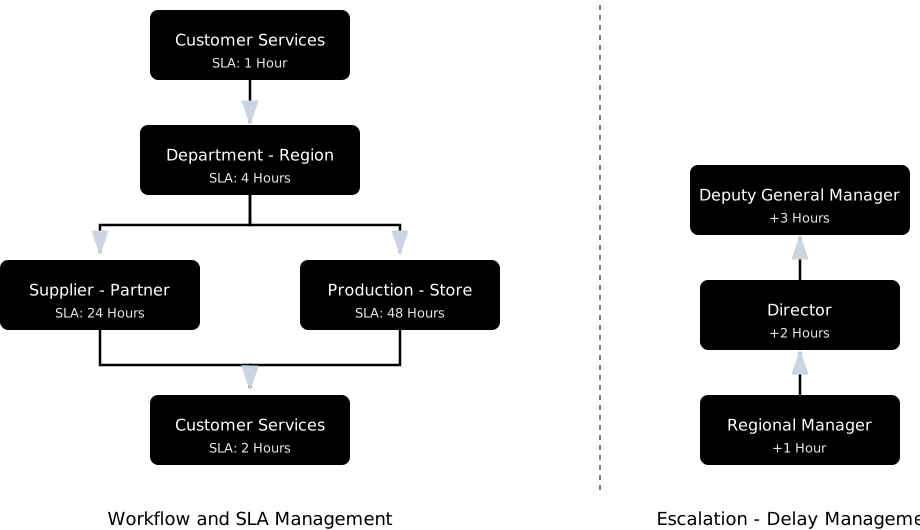
Extend workflows with unlimited sequenced steps, assign groups or individuals, define tasks, forms, and checklists — all without code.
Define deadlines per step, send alerts as deadlines approach, and trigger escalations automatically when thresholds are exceeded.
Collect required data and documents, enforce quality assurance checklists per step, and ensure completeness before progression.
Define distribution logic for task assignment, conditional routing between steps (e.g., VIP paths), and automated decision-making.
Track service levels per step and for the entire workflow; define SLAs per category; monitor delays and trigger hierarchical escalations.
Every action, decision, and timestamp is logged. View previous actions at each stage, supporting quality, compliance, and training.
Structured data captured along the path feeds analytics and CAPA so recurring problems are fixed, not just answered.
CX teams can update flows, forms, and rules without IT, so operations keep pace with the business.
Predefined workflows + checklists ensure the same issue gets the same treatment, no matter who handles it.
Not just ticket forwarding — complete workflows that handle every case from start to finish.
Many tools simply forward emails or chats to departments and call it “workflow.” Even with keyword routing, you still get inconsistent handling, missing data, no step-level SLAs, and little prevention.
Category-specific workflows designed by CX experts. End-to-end resolution with tasks, conditions, approvals, and integrations — all without code.
A real-world example of a workflow in action — from ticket entry to resolution and prevention.
Correct form appears; must-have data is collected upfront (order number, delivery date, missing item line, channel, short description). Evidence upload (box contents / invoice image) and validation ensure completeness.
System notifies customer; if evidence is missing, it requests it automatically. Delivery/PoD (Proof of Delivery) data is checked and tasks are assigned to relevant stakeholders such as “store confirmation”. Policy checks determine the remedy (refund the missing item amount, issue a compensation coupon, and reship if needed).
If store confirmation is delayed or a deadline is approaching, the system sends a warning; once the 4-hour SLA is breached, it escalates the case with full context along the escalation chain: first the Regional Manager (+1 h), then the Director (+2 h) if still unresolved. A compensation rule can be suggested based on customer tier (refund + coupon).
Refund is completed by finance, a compensation coupon is issued, and the customer is notified via their preferred channel. Checklists confirm all steps completed (evidence received, store confirmation, refund/coupon, final notification). Case closes with cause code and metrics logged.
Data rolls into category dashboards and root-cause reports (e.g., a counting error during shift handover). Patterns identified trigger CAPA actions to prevent repeats — fixing the problem, not just answering tickets.
Set up workflows step by step with guided editors — configure stages, assignments, SLAs, and actions without writing a single line of code.
CX teams can update flows, forms, and rules without IT. Change workflows in minutes — test, preview, and roll out to specific categories or entire business lines. Operations keep pace with the business, not development queues.
Less rework, fewer emails, clear ownership at every step. Structured workflows eliminate guesswork and ensure nothing falls through the cracks.
SLAs and escalations are enforced automatically. Managers get visibility into delays and bottlenecks, enabling proactive intervention.
Clean, category-level data enables real root-cause elimination. Analytics reveal patterns that trigger prevention actions, not just reactive fixes.
Next4biz enables us to design a separate process for each topic title and define different escalation times for each process.
Every request or complaint reached is evaluated by informing the customer at every step it is handled. Automatically, information is given to the customer at each step of the process via email or SMS according to their communication preferences.
Previously, it took 15 days to complete a consumer visit outside Istanbul. But with Next4biz, we reduced SLA times to 1 week on both the factory side, customer communication center side, visit side, and product review side.
The most common questions, starting with how workflows are set up, what happens when an SLA is breached and which indicators process health is tracked with.
A ticket that cannot be resolved at first contact is routed into the workflow defined for its category. The flow consists of as many sequential steps as needed; each step has a responsible team or person, the data to be collected, a quality checklist and a time limit. Conditional routing branches between steps — for example a faster path for a VIP customer.
Help desk tools capture the call and forward the email to a department; sometimes they assign it with a keyword rule and call that a "workflow". Next4biz carries the request through to resolution: it collects the right data, verifies the status from integrated systems, selects the corrective path according to policy, closes with a reason code and metrics, and then feeds root cause analysis.
Service levels are tracked both per step and end to end. Alert messages are sent as the deadline approaches; when the threshold is exceeded, hierarchical escalation is triggered and the team lead is notified with full context. Managers see in the dashboard which stage each ticket is at, where it is delayed and which actions have been taken.
Yes. Through ERP, OMS and CRM connections, order status, product information and the customer record can be verified inside the workflow. In a delivery delay flow, for example, the shipment status or proof of delivery (POD) is checked through the integration and the return, exchange or reshipment path is selected according to the policy check.
No. Steps, owners, durations, forms, checklists, approvals and business rules are defined in the visual designer without writing code. A change can be applied to a single category or to an entire line of business; the definitions are managed from one place together with the category tree. When a regulation or policy changes, the system is adapted without waiting for a vendor request. No-code structure → For a comparison with platform-based tools: next4biz as a Salesforce Service Cloud alternative →
You correct it immediately from the same visual editor. Changes can be tested and previewed before going live, and published to specific categories or to all lines of business separately. Who changed what and when is tracked in the change log; role-based permissions determine who can make changes. No-code structure →
No. The category tree and the workflows attached to it are extended according to your organization's needs; each category is configured separately with its own form, SLA, business rules and escalation chain. Adding a new category is not a new project but a definition task in the existing editors; a shared change is applied to selected categories or to the whole line of business in one go.
Step-level SLA compliance, delayed steps, the number of escalations and category-level resolution times are tracked in dashboards. The reason codes assigned at closure feed root cause analysis; for recurring problems, corrective and preventive actions (CAPA) are triggered — the problem is not just answered, it is fixed. Maturity test →
See our presentation and demos in a meeting with our product consultants, and let’s evaluate our autonomous customer service architecture together on your own channels and processes.
During the meeting, you can review with our experts: