
Enterprise Customer Service for Banks
Next4biz CSM is an omnichannel, workflow-based and AI-powered enterprise customer service management solution.
Next4biz is built for regulated industries and is already deployed in the German banking sector, including KT Bank AG, a BaFin-licensed institution. Our platform is hosted in a Germany (Frankfurt) Microsoft Azure Data Center with full EU data residency.
Trusted in financial services
Omnichannel Communication
Next4biz CSM is more than a simple ticketing or helpdesk tool; it is an AI-powered, omnichannel, end-to-end customer service solution. It consolidates all communication channels — call center, email, live chat, in-app chat, WhatsApp, social media, complaint platforms, AppStore, Play Store, and review sites — into a single, unified experience.
All channels share a unified customer profile and conversation history. When a customer moves from chat or email to phone, every agent sees the complete journey. No repetition, no lost context, no fragmented experience. The interaction feels seamless, as if there were only one channel. Customers are recognized across all channels. Agents have access to comprehensive customer data. They are also provided with sentiment analysis for customer satisfaction scores and previous tickets.
Next4biz recognizes the caller from the number, pulls context from your systems through APIs, and brings the full cross-channel history to the agent screen — before the call is even answered.
Next4biz works with cloud or traditional call centers that support CTI. It recognizes the customer from the caller number, queries existing systems through APIs and brings the necessary information, together with the customer's history across other channels, to the agent screen. The agent can see the customer and issue context before the call is even answered.
Issue Intelligence guides the call center agent during the conversation. It helps collect the right information, categorize the issue accurately and transfer it to the relevant workflow.
The Supervisor Bot answers call center agents' questions and provides guidance based on the organization's knowledge, procedures and past experience.
Channel · Messaging
Embed Next4biz live chat into your website, online banking and mobile apps — and manage WhatsApp in the same place. The AI Chatbot resolves issues end-to-end, in the same channel.
Next4biz instant-messaging interfaces can be embedded into websites and web applications. In e-commerce, online banking, self-service portals and similar digital experiences, customers can get support directly through live chat inside the application. The same live-chat infrastructure can also be integrated into mobile apps.
Customer conversations coming from WhatsApp can be managed in the same structure. Through APIs, the system works with your existing applications, CRM, ERP and other enterprise systems.
The AI Chatbot can handle conversations from live chat and WhatsApp, retrieve the necessary information from connected systems, resolve the issue and respond to the customer in the same channel.
Channels · Written
Social media, complaint & review platforms, app stores, email and your own web/mobile apps — monitored, managed and answered from one place. The AI Agent filters noise, classifies, resolves what it can, and routes the rest to a workflow.
Social media: Next4biz integrates with your social profiles, monitors comments and messages, and brings them into Next4biz screens. Track, manage and respond from a single place; replies are published back to the relevant channel. The AI Agent can produce an automated resolution and respond, or send the issue to Issue Intelligence for categorization, prioritization and routing.
Review & complaint platforms: Next4biz integrates with platforms such as Şikayetvar and Trustpilot, app stores (Google Play, Apple App Store) and Google Business Profile reviews. The AI Agent first evaluates content for relevance — filtering out emojis or contextless content — then identifies the issue type (request, complaint, thanks, suggestion) and priority, queries existing systems through APIs, and can respond in the relevant channel.
Email: When the email addresses you use to collect customer issues are defined in Next4biz, incoming messages are brought into Next4biz screens and answered through the email channel from a single place. The AI Agent evaluates relevance, determines type and priority, analyzes content, queries systems through APIs and can respond by email.
Web & mobile applications: Customer issues submitted through your web or mobile apps integrate with Next4biz — tracked, answered and resolved in Next4biz screens. The AI Agent analyzes, can produce automated resolutions, or routes to the right workflow.
Channel · Self Service
Offer self-service through your website, mobile app or customer portal — customers create and track tickets, search answers through bots, and browse your knowledge base.
Next4biz Self Service lets customers create tickets, track tickets they submitted through any channel, search for answers through bots and browse your knowledge base — from your website, mobile app or customer portal.
When the AI Agent is integrated, it analyzes issues from self-service channels, can produce automated resolutions when appropriate and respond to the customer. If the issue cannot be resolved automatically or requires a workflow, it sends it to Issue Intelligence; the issue is then categorized, prioritized and routed to the right workflow.
Workflows, Automations & SLA
Next4biz provides no-code configurable workflows, service level, and escalation management capabilities. If cases received from any channel cannot be resolved at the first contact, they are routed to workflows defined for the corresponding category. Using no-code editors, workflows can be extended with as many steps as needed, and these steps can be sequenced.
For each step, responsible groups or individuals can be assigned. Time limits can be defined, along with alert messages to be sent as deadlines approach and escalation actions to be triggered when deadlines are exceeded. Tasks for each step, forms to collect required data and documents, and checklists for quality assurance can all be defined through no-code configuration. Business rules can determine how tasks are distributed among responsible staff.
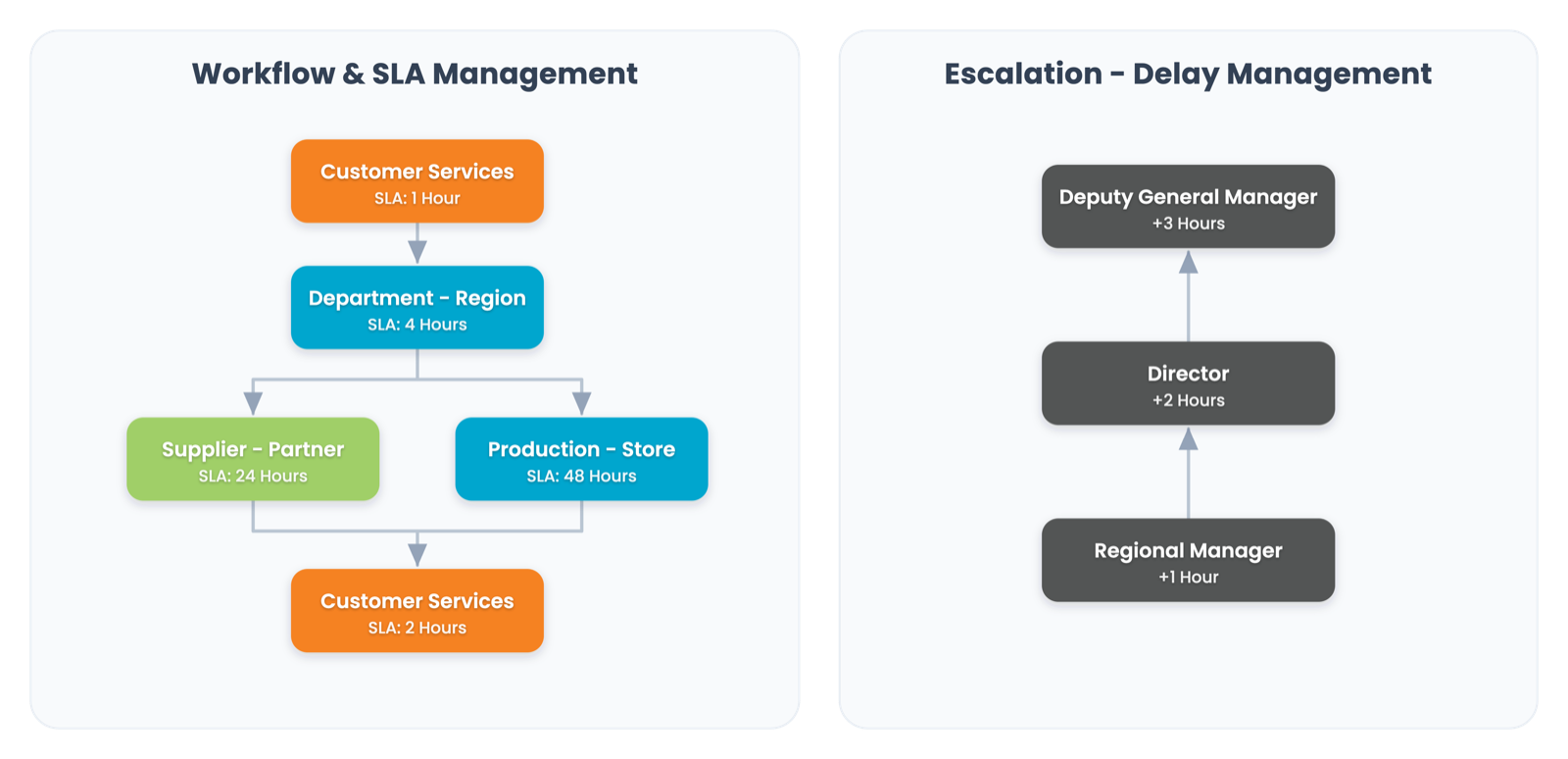
Conditional routing between steps is also possible — for example, directing VIP customers to a different path. Service levels can be monitored per step as well as for the entire workflow. Workflows are a built-in feature of the product, and authorized personnel can view previous actions taken at each stage. Managers can track which stage each case is in, which steps are delayed, and, if appropriate, even share a summarized history with the customer during the resolution process.
Authorized users have access to customer data, including order and product details, and a complete history of tickets across all communication channels, departments, and involved parties, regardless of the issue's origin. They are also provided with sentiment analysis for customer satisfaction scores and previous tickets.
A real banking workflow example — from intake to resolution and prevention.
Analytics & Reporting
Because Next4biz is the system of record, the data and metadata required for regulatory reporting already live in the schema — ready to query and export.
Next4biz generates compliance exports through its reporting capability and BI integration. Because the platform serves as the system of record, all required regulatory data points and metadata are already resident within the database schema, allowing for direct querying and extraction.
For reporting and analytics, Next4biz provides BI integration: tools such as Power BI, Tableau and Qlik are fed through ready-to-use APIs, so reporting and dashboard needs are met in the bank’s own BI environment.
AI Analyzers & BI Dashboards
AI analyzers in Next4biz CSM do more than record customer issues; they turn those issues into meaningful data, summaries, forecasts and actionable insights.
Evaluates expressions in incoming issues and assigns sentiment labels — happy, unhappy or neutral — for use in filters, reports and CX analyses.
Uses sentiment across all of a customer's issues to produce a five-level satisfaction score — identifying churn risk early and triggering automated actions.
Predicts how many issues may arrive in each category in the coming period — helping teams plan resources and spot rising volume.
Summarizes the complete history of an issue, from customer communication to actions taken by internal teams within the workflow.
Reviews the tickets in the categories you select, or across all of customer service, for the date range you set, using the AI summarization service. It sets out the core problems, the most prominent dissatisfaction, the theme distribution and root causes, and shows where to start.
Security & Regulatory Compliance
Next4biz CSM is hosted and operated in the data center the customer chooses — the European Union, the United Kingdom, the United States or Türkiye. Personal data is stored and processed without leaving the relevant region, so the solution is inherently aligned with regulations such as GDPR and KVKK, as well as general and sector-specific regulations in Germany and Türkiye.
EU · UK · USA · Türkiye — data stays in the region you choose.
Information Security Framework, Data Privacy & Independent Audits, Data Retention & Destruction, Business Continuity.
GDPR Compliance, Local Data Residency, KVKK Commitment and Privacy Notice.
Independently audited ISO/IEC 27001, 27701, 22301, 10002, 9001 and BS 10012.
No-Code Customization
Next4biz CSM is a completely no-code platform (except for integrations). Visual design editors let business users customize workflows, forms, scripts and templates. With minimal training, staff who can document their work can design or modify processes — changes show up in the product immediately.
Define categories and subcategories; assign responsible groups, workflows and forms.
Design category-specific workflows with no-code editors; define SLA targets and escalations.
Design category-specific interfaces — forms, data fields and form rules.
Define if/then rules for routing, approvals, notifications and triggers.
Guide agents through structured, consistent, category-specific interactions.
Resolve frequent requests through menus; route free-text requests outside the menus to an LLM bot, or to a live agent when needed.
Ready-to-use email and chat templates so teams respond with consistent language.
Track volume, SLA compliance and team performance; spot improvement opportunities.
Integration & APIs
Next4biz exposes APIs and webhooks for programmatic data exchange (reference docs at developers.next4biz.com), with native pre-configured connectors, and broker support such as Apache Kafka and RabbitMQ for decoupled architectures. An internal inventory layer stores integrated data so your no-code customization stays independent of integration concerns.
Next4biz supports bi-directional data exchange both for custom applications and for third-party systems where pre-configured connectors are unavailable. It uses an internal repository — an "inventory" — to store and process integrated customer and other relevant data. This inventory is the foundation for all interfaces, business rules, checklists and other objects used in omnichannel communication and resolution workflows. Integrations are activated as needed, always interacting through these inventory layers, so the no-code architecture and flexibility remain unaffected by potential integration issues.
Native omnichannel connectivity for live chat, WhatsApp, email, call centers, social media, review platforms and marketplaces.
SSO (SAML 2.0 / OAuth2 / OpenID Connect), LDAP/Active Directory, optional SCIM provisioning for user & group sync.
Bi-directional REST APIs & webhooks. Sync customers, accounts, transactions, requests, policies and orders for live context.
Embed reusable iFrame/JS components (self-service, notifications, chat) into your portals and apps — quickly and securely.
BI integration: ready-to-use APIs for Power BI, Tableau and Qlik.
SDKs and ready UI components for in-app self-service and chat — the same experience across web and mobile.
Issue Intelligence
Issue Intelligence first analyzes every ticket from every channel and removes noise from written channels — filtering out or de-prioritizing emojis, irrelevant messages from automated email lists, misdirected support emails, and content too short to interpret.
Then, using what it has learned from past tickets and established categories, it automatically categorizes tickets. This works seamlessly across all channels — email, live chat, WhatsApp, social media, review platforms, marketplaces, phone calls and self-service portals.
It uses advanced content analysis to ensure consistent classification across all touchpoints, significantly reducing manual categorization effort and minimizing operational errors. The same intelligent categorization logic is applied regardless of where the inquiry originates — streamlining routing, improving response efficiency, and ensuring each ticket reaches the right team with the correct priority and context.
Emojis, irrelevant messages from automated email lists, misrouted support emails and contextless content are filtered out or marked as low priority.
Using historical issues and built-in categories, it automatically determines the issue type, topic and context.
Intelligent classification simplifies routing, improves response efficiency and helps every issue reach the right team.
Even when the channel changes, the same categorization logic applies — reducing manual effort and operational errors.
The same engine filters, categorizes and routes every incoming message — email, social media, reviews and marketplaces — into the right workflow.
No matter where the customer issue comes from, the system applies the same classification principles with advanced content analysis. This creates a shared, learning and consistent categorization layer instead of different interpretations by different teams.
Book a working session with our team — we'll walk through your channels, workflows and compliance requirements.
Schedule a Meeting